Watch the sheet
Make watches new rows in your Google Sheet. Put a test script in Notes (column A).
Use Google Sheets, Make and ElevenLabs to automate a practical voiceover workflow. Get the Make blueprint, a starter sheet and an illustrated guide—then customize it for your accounts.
Free download. Make and ElevenLabs accounts required. Depending on usage, paid plans or credits may apply.
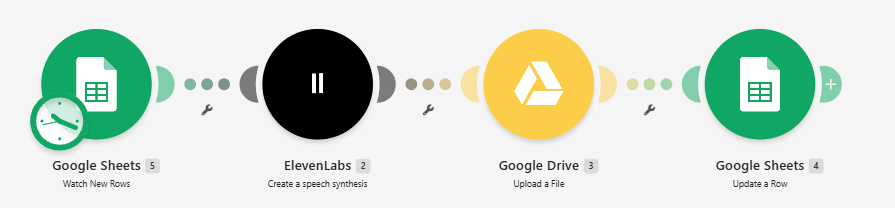
This image shows the creator's working configuration, not a simulated dashboard.
It uses text-to-speech, not voice cloning, and saves the MP3 in the Google Drive folder you select.
Make watches new rows in your Google Sheet. Put a test script in Notes (column A).
ElevenLabs converts that text using Multilingual v2 and the premade Daniel voice.
Make uploads the generated MP3 to a folder in your own Google Drive.
The same spreadsheet row receives a file URL in column B. File access depends on your Drive permissions.
Import a shareable workflow, follow the setup instructions, and verify the result with a real test row before switching on scheduling.
Release note: The original scenario has been run successfully; the sanitized shareable blueprint still requires a fresh-import test. Each user must reconnect Google Sheets, ElevenLabs and Drive.
These are optional external sign-up links. You can also use existing accounts.
Runs the four-step automation and its schedule. Import the blueprint and reconnect your apps.
Create a Make account ↗Converts your source text into audio using the voice you select in the Make module.
Explore ElevenLabs ↗Want Make to generate a complete vertical MP4 with real B-roll footage and captions from your script? Connect Fliki AI.
Explore Fliki AI ↗ · Read reviewAffiliate disclosure: the Make, ElevenLabs and Fliki AI links may earn AI SaaS Lab a commission from qualifying sign-ups, at no extra cost to you. Read our policy.